HitPaw Photo Enhancer Free: AI Clarity & Photo Upscaler Online
Discover a modern browser alternative to HitPaw photo enhancer free tools. Sharpen blurry portraits, eliminate high-ISO sensor noise, and upscale photos to 4K resolution directly online without watermark locks or software installation.
Definition: A hitpaw photo enhancer free tool refers to software or online utilities designed to upscale blurry pictures, remove noise, and enhance facial details. While conventional desktop tools restrict free exports with watermarks, modern web alternatives provide instant browser-based clarity.
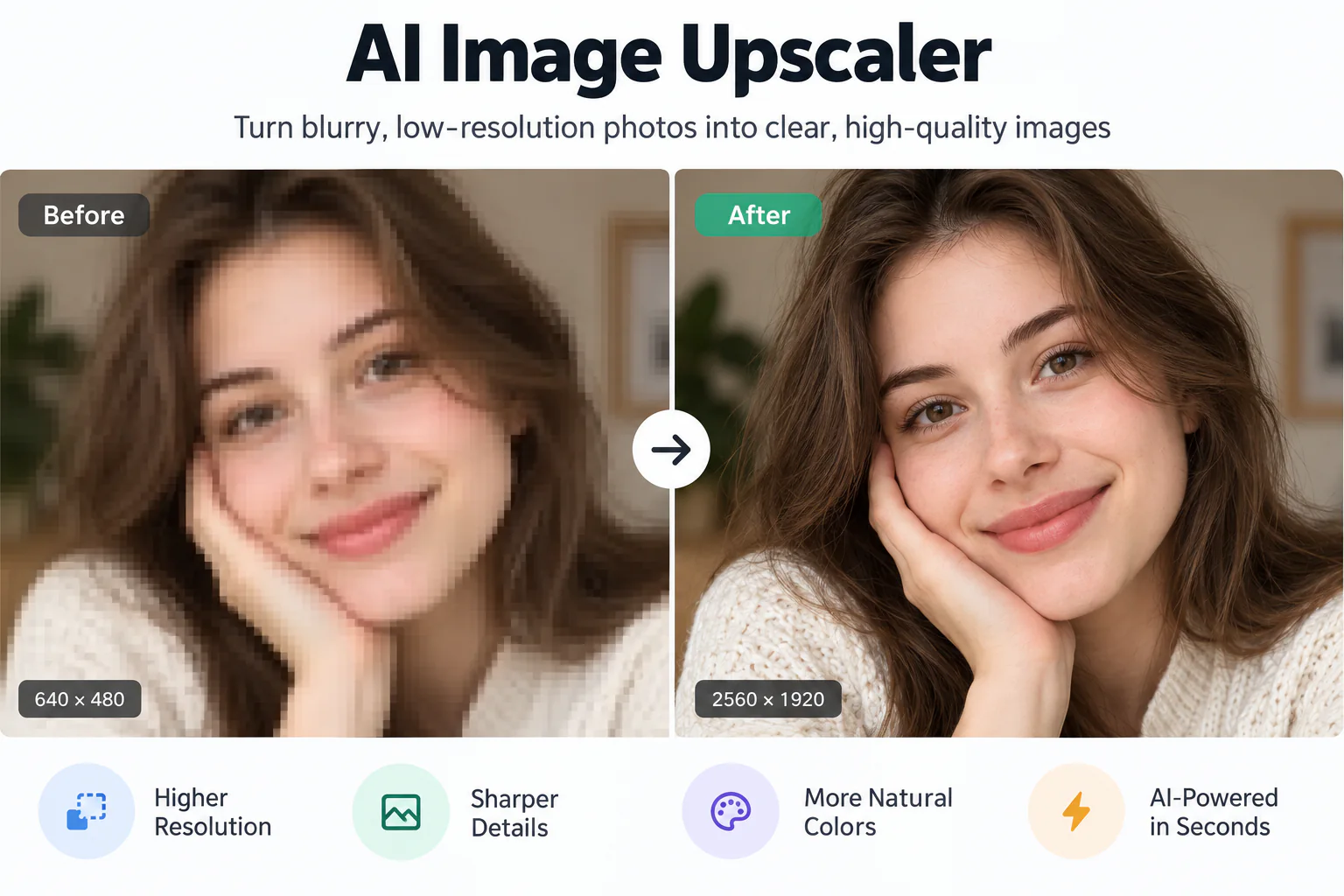
Drop an image here or click "Generate 4K Preview" to test our free online alternative.
Deep Neural Super-Resolution: How Web AI Replaces Legacy Desktop Enhancers
For years, creators searching for a hitpaw photo enhancer free download have encountered heavy installation files, rigid system requirements, and export paywalls. Traditional desktop tools rely on local graphics hardware to execute deep deconvolution, which often slows down consumer laptops. Furthermore, standard trial modes frequently imprint visible watermarks across preview images, preventing users from saving completed files unless they purchase a paid subscription license.
In contrast, modern browser-based AI harnesses cloud-accelerated computing to deliver high-resolution photo restoration on demand. By leveraging the High-Fidelity AI Engine, our platform reconstructs missing photographic textures, balances luminance noise, and restores subtle facial landmarks in seconds. Whether you need to fix a single portrait or improve product packshots, you can achieve professional clarity without installing multi-gigabyte software packages or dealing with restrictive trial locks.
Unblur AI Image Free: How to Enhance an Old Photo or Blurry Picture
Blurry photographs typically suffer from two distinct issues: optical defocus caused by incorrect focal depth and motion blur introduced by camera movement or fast-moving subjects. Traditional photo editors attempt to sharpen these defects using unsharp masking, which merely exaggerates edge contrast and creates harsh digital halos. A modern ai picture enhancer utilizes deep learning models to predict what the original scene looked like before optical degradation occurred.
When restoring vintage prints or degraded family archives, our automated neural pipeline separates aged film grain from underlying facial structures. The algorithm suppresses physical paper scuffs, reconstructs faded contrast curves, and sharpens soft contours while preserving genuine archival characteristics. Users looking for a hitpaw photo enhancer free online solution can achieve crystal-clear portrait fidelity, restore precious memories, and download uncompressed files directly within their web browser.
Core Neural Modules Powering Free Photo Enhancement
Explore the modular deep learning pipeline engineered to restore blurry pictures, eliminate sensor artifacts, and generate 4K outputs.
Ultra-HD 4K Geometric Upscaling Matrix
Upscaling low-resolution captures to 3840x2160 pixels requires sub-pixel texture prediction. Our High-Fidelity AI Engine analyzes edge vectors to reconstruct architectural lines, fine foliage, and textile patterns without jagged staircase distortion.
- Output Resolution: Sharp 3840x2160 ultra-high-definition exports.
- Sub-Pixel Synthesis: Deconvolves optical blur while preventing ringing artifacts.
- Color Fidelity: 100% preservation of native sRGB and display color gamuts.
Facial Detail & Iris Landmark Recovery
Specialized neural layers detect facial landmarks, restoring clear iris reflections, individual eyelashes, and authentic skin pore micro-textures.
- Identity Preservation: Locks facial geometry without uncanny distortions.
- Realistic Texture: Eliminates fake airbrushed plastic skin smoothing.
Adaptive High-ISO Sensor Denoise
Isolates chromatic color speckles and high-ISO luminance grain from ambient night photography while preserving critical low-light shadow gradients.
- Shadow Recovery: Brightens underexposed photo regions cleanly.
- Color Noise Removal: Cleans purple and green digital noise speckles.
Lossless Compression Remediation & De-Banding
Heavy social messaging compression introduces discrete 8x8 block artifacts and visible banding across solid backgrounds. Our de-quantization filter smooths tonal transitions and restores continuous gradients.
- JPEG Block Eradication: Eliminates block boundaries without softening details.
- Smooth Tonal Blending: Replaces stepped posterization with organic gradients.
- Export Formats: Save as uncompressed PNG or optimized WebP master files.
Practical Scenarios to Enhance Photos Online Free
Discover how creators, e-commerce sellers, and photography enthusiasts leverage modern online AI photo enhancer tools to elevate their visual media.
Portrait & Selfie Sharpening
Upgrade smartphone selfies and portraits into crisp profile pictures. Reconstruct natural hair strands, clean eye contours, and preserve authentic skin texture.
Old & Faded Family Photos
Digitize vintage family prints, remove physical scan noise, and restore faded black-and-white or sepia photographs to modern high-resolution clarity.
E-Commerce Product Visuals
Prepare razor-sharp product listings for online stores. Upscale packaging textures, sharpen product labels, and remove distracting sensor noise.
Print-on-Demand & Posters
Upscale digital artworks and camera captures to 300 DPI master files suitable for physical poster printing, canvas framing, and promotional merchandise.
How to Enhance Photos Free Online in 4 Steps
Follow this straightforward step-by-step workflow to restore blurry images using our hitpaw photo enhancer free alternative.
Upload or Select Source Photo
Choose your low-resolution, blurry, or vintage image in JPG, PNG, or WebP format up to 10 MB. Files are loaded securely within your browser session.
Choose Enhancement Profile & Scaling Factor
Select your target enhancement profile (portrait, 4K clarity, low-light denoise, or catalog print) and customize neural parameters in the text field.
Trigger High-Fidelity AI Processing
Click the enhancement button. The High-Fidelity AI Engine performs deep deconvolution, suppresses noise grain, and synthesizes missing sub-pixel textures.
Inspect Before & After Slider and Export Without Watermark
Use the split comparison slider to evaluate side-by-side sharpness improvements, then download your uncompressed master file with zero watermark stamps.
Architectural Comparison: Free Web Alternative vs Desktop Software
Compare how our browser-based photo enhancer alternative stacks up against desktop suites and typical cloud tools.
EnhancePhoto (Modern Web AI)
- Resolution: Up to 3840x2160 native 4K
- Free Export & Watermarks: Zero watermarks with free daily credits
- Software Installation: 100% browser-based, no download needed
- System Hardware Requirements: Cloud-processed, works on any phone or laptop
- Processing Workflow: One-click preset generation and instant download
HitPaw Desktop Software
- Resolution: High resolution supported on paid tiers
- Free Export & Watermarks: Free trial restricts unwatermarked exports
- Software Installation: Multi-gigabyte local application installer
- System Hardware Requirements: Requires dedicated local GPU and RAM
- Processing Workflow: Manual installation and desktop software updates
Standard Commercial Cloud AI
- Resolution: Frequently capped at standard 1080p
- Free Export & Watermarks: Aggressive subscription paywall popups
- Software Installation: Browser-based but requires account signup
- System Hardware Requirements: Remote server queues with long wait times
- Processing Workflow: Strict monthly credit limits and forced tiers
Frequently Asked Questions About HitPaw Photo Enhancer Free
Explore clear answers regarding desktop photo enhancer trial options, export restrictions, and our browser-based AI tool.
Imaging Specifications & Authoritative Technical References
Our image processing workflows align with established digital imaging standards and scientific super-resolution specifications.
Explore More AI Photo Enhancement Tools
Discover dedicated neural workflows across the EnhancePhoto ecosystem for 4K upscaling, retro pixel art, and deblurring.
Online Photo Enhancer 4K Free
Upscale blurry pictures to 4K resolution with deep neural clarity and zero watermarks.
AI Image Enhancer
General-purpose photo enhancement for portraits, low-light snapshots, and landscapes.
AI Image Upscaler
Magnify pictures by 2x, 4x, or up to 8x resolution with deep generative inpainting.
Pixel Art Upscaler
Enlarge retro 8-bit and 16-bit game sprites to 4K with nearest-neighbor integer fidelity.
AI Photo Enhancer Free 4K
Upscale blurry pictures to 4K resolution with deep neural clarity and zero watermarks.
Adobe Express Free Image Enhancer
Online alternative to sharpen blurry pictures and upscale to 4K resolution.
Ready to Enhance Your Photos With Free AI Clarity?
Experience high-fidelity photo restoration today. Upload any photograph to deblur, denoise, and upscale in seconds using our modern web tool.